
Since Video Hub 2.1, the plugin went through thirteen releases. Together they change how you find videos, how imports run and how you look after a growing library. Here’s what’s new in Video Hub 2.2 and 2.3 — every update is free for sites with an active license.
YouTube Shorts, the right shape
Video Hub now detects the real proportions of every video when it imports it and embeds each one that way. Shorts and other vertical videos play vertical — on single pages and inside playlists, next to your widescreen videos. Automatic imports can skip Shorts, the Import videos page labels and hides them, and imports can keep only videos within a duration range. More in YouTube Shorts in WordPress.
A new Import videos page, built for choosing
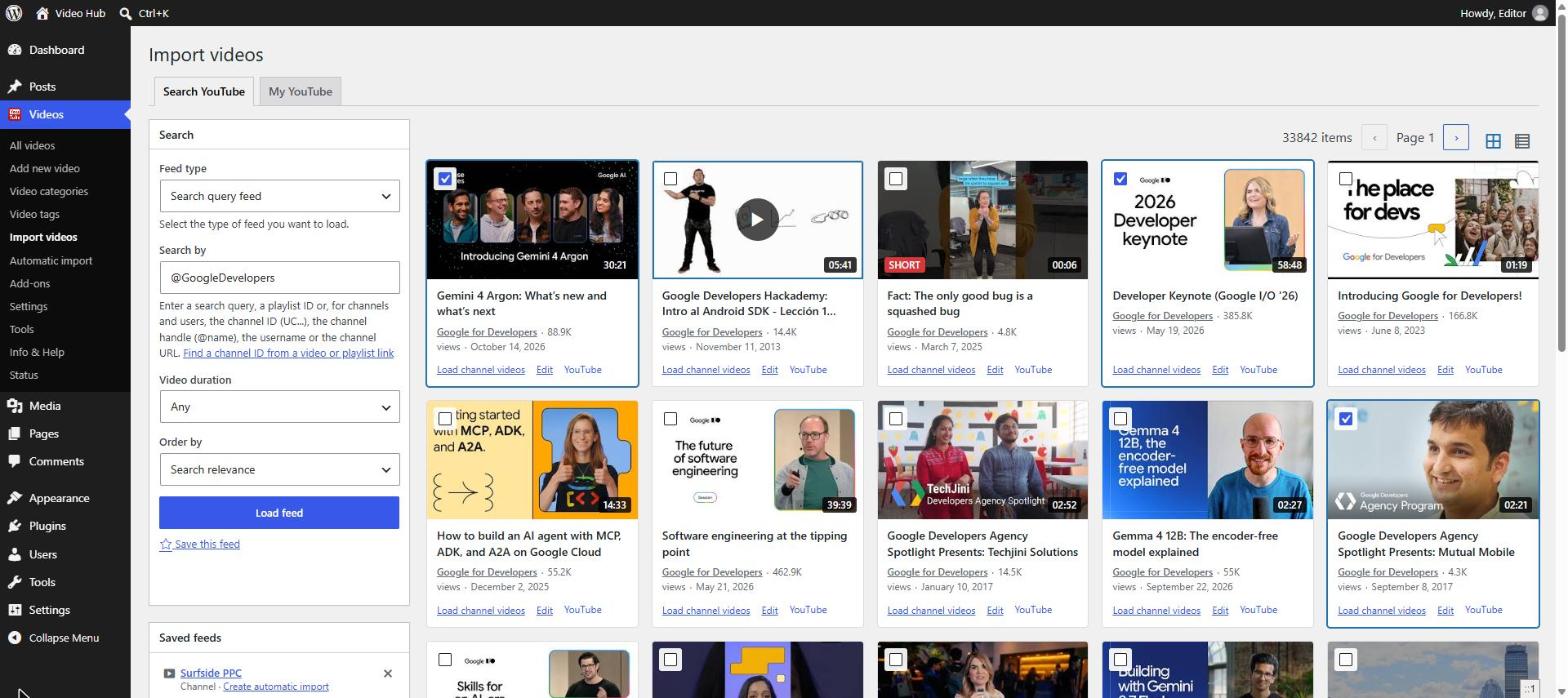
- Cards and previews. Results show the thumbnail, duration, channel, views and date. Click to preview a video — no API quota used — and move through results with the keyboard.
- A selection that follows you. Pick videos across pages and across feeds — searches, channels, playlists — and import them together.
- Already imported? Those videos are marked, linked to their posts, and can be hidden.
- Saved feeds for the channels and searches you check often, and an automatic import of the loaded channel or playlist in one click.
- My YouTube moved into the page and now lists private and unlisted playlists too.
Review before you publish
Manual and automatic imports can create posts as published, draft or pending review, each with its own setting. Collect videos from many channels as drafts and let an editor add context before they go live — the workflow we describe in Video Hub for publishers.
Automatic imports you can see into
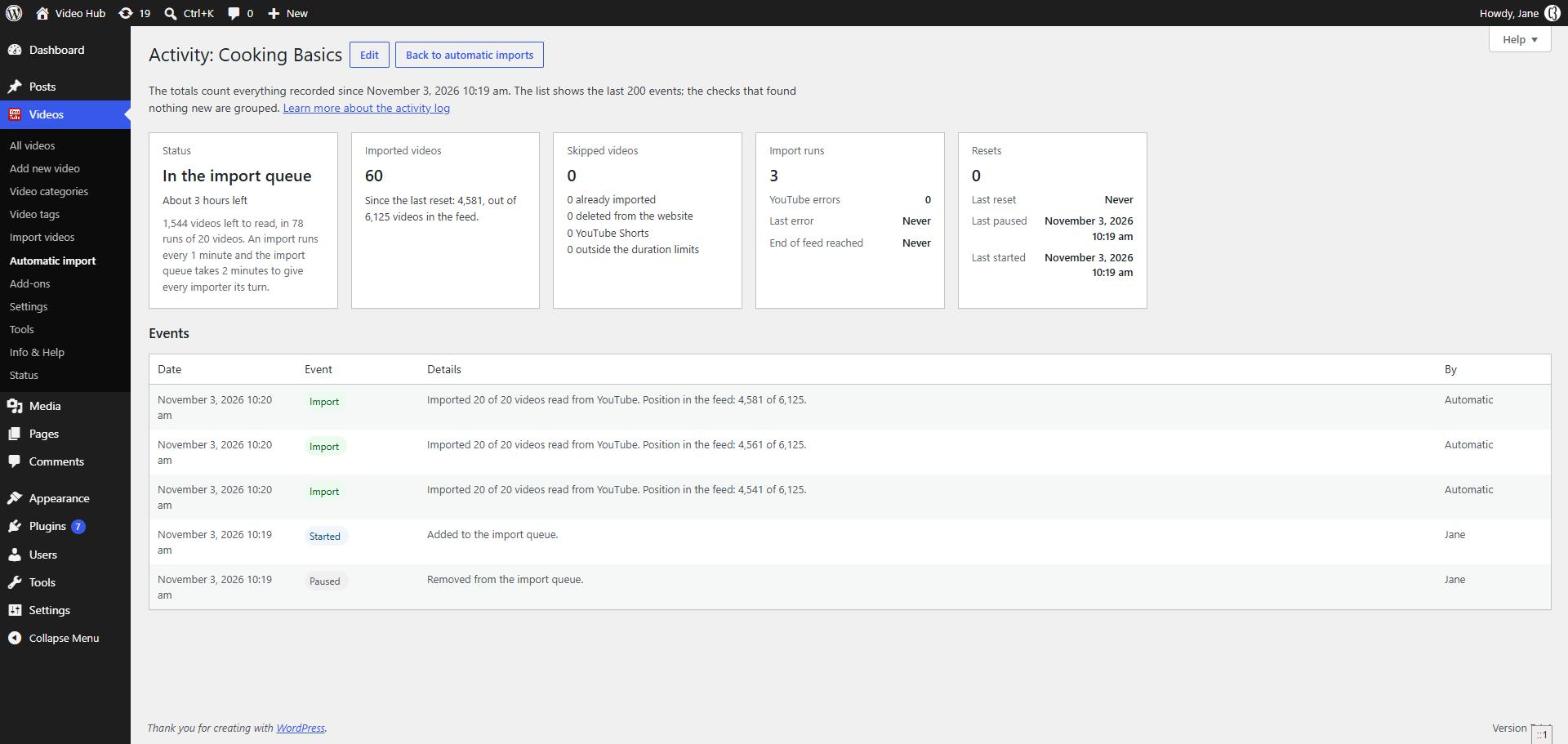
- A redesigned Automatic import page with a status sidebar, the import queue, today’s estimated quota and each import’s last YouTube error.
- An import estimate — how long until the rest of a channel is imported.
- An activity log for every import: imported and skipped videos (and why), runs, errors, resets and pauses.
- Import new videos right away while a large back catalog is still importing.
- Don’t import deleted videos again — delete a video from your site and that import leaves it alone.
The Tools page
A new Videos → Tools page looks after the library once it’s built:
- Update videos refreshes views, likes, thumbnails, proportions and privacy status — optionally titles, descriptions and tags — in the background.
- Thumbnails repairs missing featured images in bulk, without API quota.
- Delete videos removes posts older than a number of days, with their images.
- Channel ID finds any channel’s ID, uploads playlist and RSS feed from a URL, @handle or video link.
A player that follows YouTube’s rules
We checked every player option against YouTube’s current documentation. New: captions on by default with a language of your choice, inline playback on iPhone, Fit in the window so players never overflow the screen, Same player for every video, and a live preview in the settings. Options YouTube no longer honours were removed or explained: “hide the YouTube logo” is gone, and suggested videos can only be limited to the same channel.
Easier setup and moving between sites
- A redesigned API & License tab with up-to-date Google Cloud steps, a Test connection button and a reconnect notice if Google revokes access.
- Channel feeds accept @handles and channel URLs, not just IDs.
- Export and import settings to set up the next site in minutes — keys and licenses are never exported.
- Thumbnails are always imported at the largest size available, and a removed video is unpublished only when YouTube confirms it’s gone.
Video Hub now requires WordPress 6.5 and PHP 7.4 or newer. The full list of changes is in the changelog, and every screen is covered in the updated documentation.