
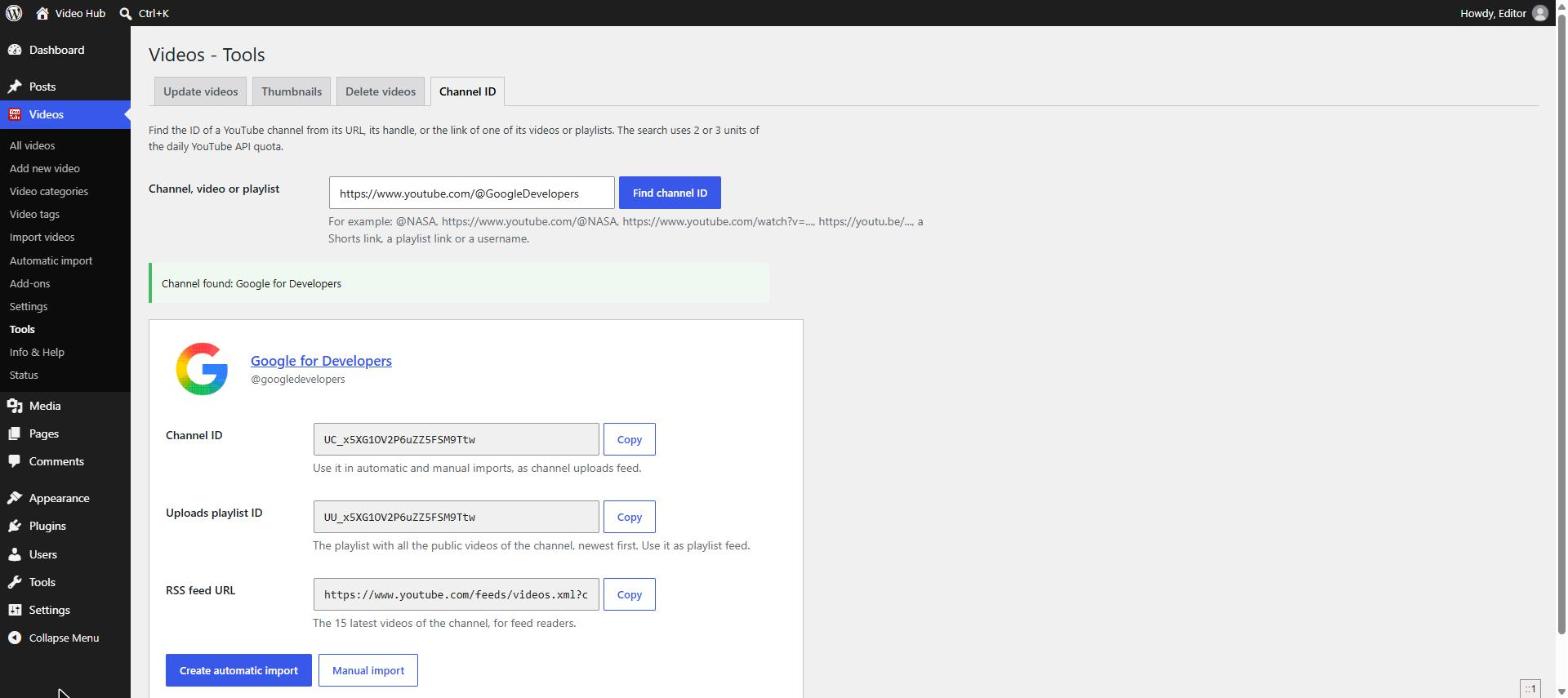
YouTube shows channel handles (@name) everywhere, but some tools still ask for the channel ID — the code that starts with UC. The Channel ID tool finds it for you, right inside WordPress. Open Videos → Tools and choose the Channel ID tab. The channel fields of the Import videos page and of the automatic import form link to it too.
What you can paste
- A channel URL —
youtube.com/channel/UC…,youtube.com/@name,youtube.com/user/name - A handle (
@name) or a username - A link to any video of the channel — watch, youtu.be, Shorts, live or embed links
- A playlist link
- A custom URL (
youtube.com/c/name) that matches the channel’s handle
Click Find channel ID. A search uses 2 or 3 units of your daily YouTube API quota.
What you get
The channel’s name and image, and three values with a Copy button each:
- Channel ID — use it as a channel uploads feed in manual and automatic imports.
- Uploads playlist ID — the playlist with all the public videos of the channel, newest first. Use it as a playlist feed.
- RSS feed URL — the 15 latest videos of the channel, for feed readers.
Below them, Create automatic import opens a new automatic import for the channel and Manual import loads its videos on the Import videos page.
You often don’t need the ID at all: channel and user feeds accept the handle, the username or the channel URL directly.
Not using Video Hub yet? Our free online YouTube Channel ID finder does the same lookup in your browser, and the guide explains where to find the ID on YouTube yourself.