
Updated November 2026
Best YouTube Plugins for WordPress (2026): 8 Compared
Channel feeds, lite embeds, galleries, branded players and full importers — the eight YouTube plugins worth a look this year, what each one is best at, what it costs and where it falls short.
How to choose
Three questions that narrow it down
Start here. Most YouTube plugins fall into one of three groups — decide which one you need and the shortlist gets very short.
Just showing a channel?
Pick a feed or a gallery
If visitors only need to watch your latest uploads on a page or two, a feed or an auto-updating gallery is quicker to set up and costs less.
Embedding a few videos?
Pick a lite embed
For a handful of videos inside articles, page speed matters more than features. Load the player only when someone clicks play.
Building a video library?
Pick an importer
If every video should be its own page that you can categorize, edit and optimize — and new uploads should arrive on their own — you need an importer.
Look atVideo Hub — or All-in-One Video Gallery if you also host your own files
Want the detail behind the importer route? See the full feature set, how the YouTube video importer works, or the live demo.
Quick picks
The best YouTube plugin for each job
There is no single “best” YouTube plugin — there is a best one for what you need to do. Start with the job, then read the full entry below.
Full disclosure: we make Video Hub, so it is on this list — as the pick for one job, importing YouTube into WordPress posts. Every other plugin is described from its WordPress.org listing, its own documentation and its pricing page, checked on 5 November 2026. Install counts and ratings are WordPress.org figures; prices change, so check the vendor’s site before you buy.
The list
The 8 best YouTube plugins for WordPress
Each entry covers what the plugin does, what it costs, its strengths and its limits — and who it suits.
01Best for turning YouTube into WordPress posts
Video Hub
- Type Importer
- Free version No
- Price $49/year (1 site) · $99 (5) · $169 (unlimited)
- Guarantee 30-day money-back
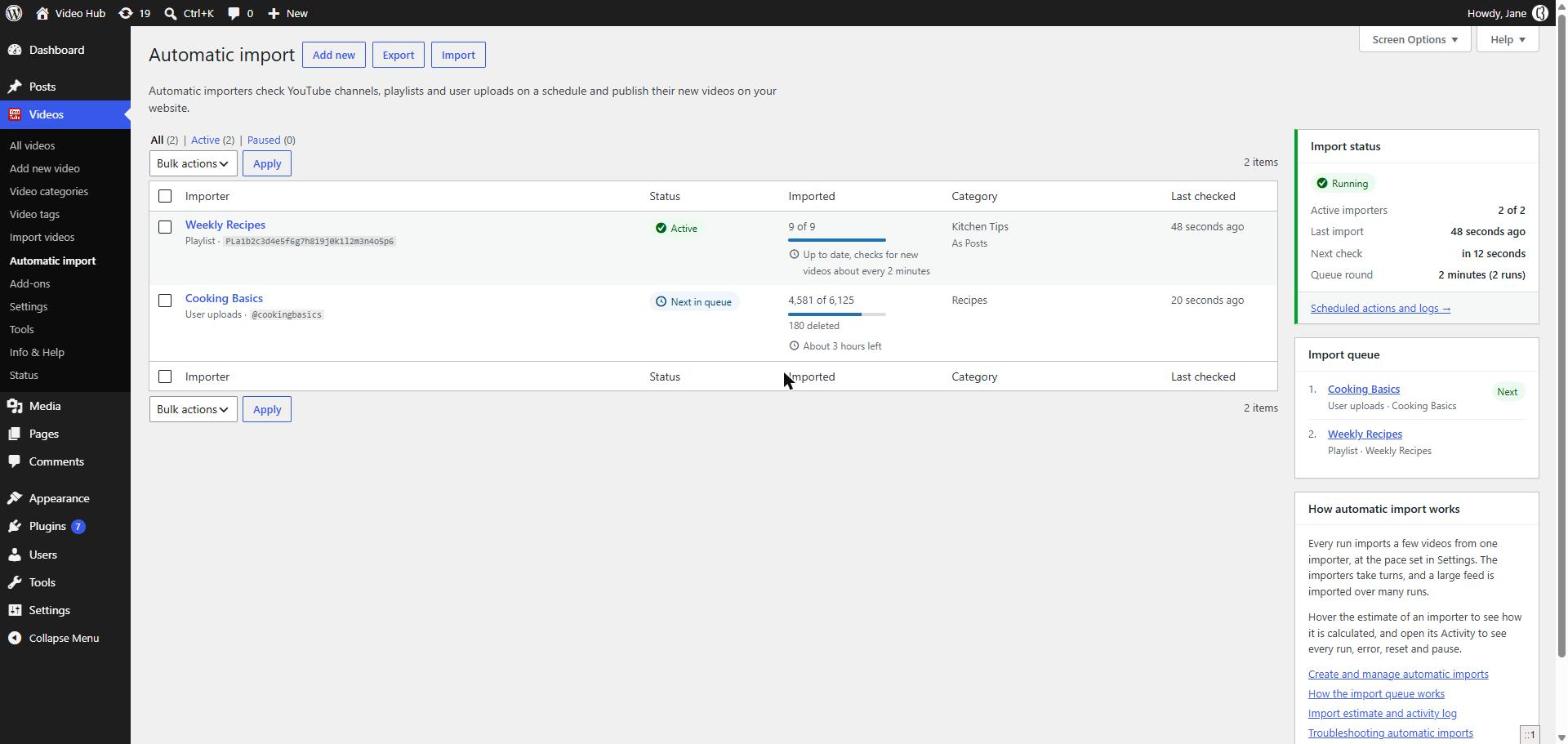
Video Hub imports YouTube videos into WordPress as real posts — regular posts or a dedicated video post type — with the title, description, thumbnail, categories and original date filled in. Automatic imports follow channels, playlists and user uploads in the background, so new uploads appear on your site on their own.
It is built around the editorial side of video: pick videos from several channels and searches in one go, import them as drafts or pending review, then keep the library healthy with tools that refresh video data, repair thumbnails and clean up old posts.
What it does well
- Imports a whole channel or playlist, back catalog included, then keeps it in sync
- Import as published, draft or pending review — per import
- 6 playlist themes, Gutenberg blocks, an Elementor widget, shortcodes and widgets
- Shorts and vertical videos keep their proportions, on single pages and in playlists
Keep in mind
- No free version — paid plans only, with a 30-day money-back guarantee
- Needs a Google Cloud OAuth connection (the plugin walks you through it)
- No live streams; the click-to-load player is the Post Video block, not every embed
★★★★★
“Great plugin. Once set up properly, it does exactly what it advertises. […] It imported my 200 YouTube videos without batting an eyelid, and has given me a new WordPress video site in a heartbeat. Fantastic!”
MrMasterKey · CodeCanyon customer
From Video Hub’s years on CodeCanyon; it is now sold exclusively by CodeFlavors.
Choose it if You want a video library that lives in WordPress, is organized your way and updates itself.
02Best for a customizable channel feed
Feeds for YouTube (Smash Balloon)
- Type Channel feed
- Free version Yes
- Pro from $49/year, 1 site (sale price; listed at $98)
- WordPress.org 100,000+ active installs · 4.8/5
Shows a YouTube channel as a list, gallery or grid that refreshes on its own, designed in a visual customizer. It caches API requests and loads the player only when a visitor interacts. Pro adds live streams, carousels and search feeds; from the Plus plan up it can also save the videos it displays as custom posts (drafts by default).
What it does well
- Visual feed customizer that inherits your theme’s styles
- Light by design: cached requests, player loaded on interaction
Keep in mind
- A feed first: videos only become WordPress posts on the Plus plan or higher
- Live streams, carousels and search feeds are Pro features
Choose it if You want a good-looking feed of your channel on a page, set up in minutes.
Need more than a feed?
A feed shows your latest uploads. If you want every video as its own WordPress post — categorized, editable and imported in the background, back catalog included — you need an importer.
See how the Video Hub importer works · Video Hub vs. Feeds for YouTube
03Best for embeds, galleries and live streams
Embed Plus for YouTube
- Type Embeds & galleries
- Free version Yes
- Pro $49.99/year (sale; listed at $69.99)
- WordPress.org 100,000+ active installs · 4.6/5
An embed plugin with a wizard for videos, channel and playlist galleries, Shorts, live streams and premieres, plus facade mode, deferred JavaScript, no-cookie embeds and a consent message. Pro adds caching, extra gallery layouts, video SEO markup and analytics.
What it does well
- Covers almost every kind of YouTube embed, live streams included
- Facade mode and deferred JavaScript in the free version
Keep in mind
- Embeds only — videos are never imported as WordPress posts
- Caching, extra gallery layouts and video SEO markup need Pro
Choose it if You embed a lot of YouTube, live streams included, and care about page-speed scores.
Want videos as posts instead of embeds? Compare Embed Plus with Video Hub.
04Best for lightweight, lazy-loaded embeds
WP YouTube Lyte
- Type Lite embed
- Free version Yes — free plugin
- WordPress.org 20,000+ active installs · 4.8/5
Swaps the standard YouTube embed for a “lite” one that looks the same but loads the full player only when someone clicks play. It works on the YouTube links already in your posts and can cache thumbnails locally.
What it does well
- Very small footprint; big gains on pages with several videos
- Works on your existing YouTube links, no re-embedding
Keep in mind
- No galleries, feeds or imports
- Single-purpose: you’ll need another plugin for anything beyond embeds
Choose it if You embed a few videos in articles and want the fastest possible pages.
05Best for a video library from several sources
All-in-One Video Gallery
- Type Video posts & galleries
- Free version Yes
- Premium from $4.99/month
- WordPress.org 20,000+ active installs · 4.8/5
Each video is a post in its own post type, played through a custom player that handles YouTube, Vimeo and self-hosted files, with front-end search, filters and access rules by user role. Automatic YouTube imports, video schema and extra templates are premium.
What it does well
- One library for YouTube, Vimeo and your own video files
- Front-end search and filters, plus restrictions by user role
Keep in mind
- Automatic YouTube imports and video schema are premium features
- Videos play in its own player, so the look differs from a standard YouTube embed
Choose it if You mix self-hosted and YouTube videos and need a searchable library, or access rules.
06Best free gallery that updates itself
Automatic YouTube Gallery
- Type Gallery
- Free version Yes
- Premium from $9.99/month
- WordPress.org 9,000+ active installs · 4.8/5
Galleries from a channel, playlist, username or search, kept current by a scheduled background sync, with a Shorts filter, vertical layouts and live search in the free version. Per-video URLs (“deeplinking”), video schema and popup or slider themes are premium.
What it does well
- Generous free version with scheduled sync
- Shorts filter and visitor search inside a gallery
Keep in mind
- Built around galleries: per-video URLs and video schema need premium
- Popup and slider layouts are premium
Choose it if You want galleries that keep themselves up to date, without paying.
Want posts, not gallery items?
Galleries are made for showing videos. If each video should be a real post on your site — with your own text, categories and comments, editable like any other post — that is the job Video Hub is built for.
07Best for a branded player on courses and landing pages
Presto Player
- Type Video player
- Free version Yes
- Pro from $79/year, 1 site
- WordPress.org 100,000+ active installs · 4.8/5
One brandable player for YouTube, Vimeo and self-hosted video, built for the block editor, with presets, captions, lazy loading and LearnDash progression. Pro adds private video, chapters and analytics.
What it does well
- A consistent, on-brand player across all your videos
- Course features such as LearnDash progression
Keep in mind
- No channel or playlist import — videos are added one at a time
- Chapters, analytics and private video are Pro
Choose it if You sell courses or run landing pages and want full control over playback.
08Best for embedding from many platforms
EmbedPress
- Type Universal embed
- Free version Yes
- Pro from $69/year, 1 site (often on sale)
- WordPress.org 100,000+ active installs · 4.8/5
Embeds from a long list of providers — YouTube, Vimeo, Spotify, Google Docs, Maps, PDFs and more — in Gutenberg or Elementor, including YouTube galleries and live streams. The generalist on this list rather than a YouTube specialist.
What it does well
- One plugin for many embed types
- Works in Gutenberg and Elementor
Keep in mind
- YouTube is one source among many, so YouTube-specific tools are limited
- Nothing is imported as WordPress posts
Choose it if Your site embeds content from many platforms and you want one tool for all of it.
Side by side
The 8 plugins compared
The features buyers ask about most, from each plugin’s own listing. “Not listed” means the vendor doesn’t mention it — not necessarily that it’s missing.
| Plugin | Main job | Free version | New uploads appear on their own | Videos as WordPress posts | Live streams | Click-to-load player | Paid from |
|---|---|---|---|---|---|---|---|
| Video Hub | Importer | No | YesBackground imports | YesPosts or a video post type | No | PartialPost Video block | $49/year |
| Feeds for YouTube | Channel feed | Yes | YesThe feed refreshes | Plus plan+Saved as drafts by default | Pro | YesPlayer loads on interaction | $49/year |
| Embed Plus for YouTube | Embeds & galleries | Yes | YesGalleries pull the latest videos | No | Yes | YesFacade mode | $49.99/year |
| WP YouTube Lyte | Lite embed | Free | No | No | Not listed | YesIts core feature | Free |
| All-in-One Video Gallery | Video posts & galleries | Yes | PremiumAuto import from YouTube | YesIts own video post type | Not listed | Not listed | $4.99/month |
| Automatic YouTube Gallery | Gallery | Yes | YesScheduled sync | PremiumPer-video URLs (deeplinking) | Yes | YesLazy loading | $9.99/month |
| Presto Player | Video player | Yes | No | No | Not listed | YesLazy load | $79/year |
| EmbedPress | Universal embed | Yes | Not listed | No | Yes | Not listed | $69/year |
FAQ
YouTube plugin questions
What is the best YouTube plugin for WordPress?
It depends on the job. For a channel feed, Feeds for YouTube by Smash Balloon. For embeds and live streams, Embed Plus for YouTube. For the fastest pages, WP YouTube Lyte. For a library of real WordPress posts that updates itself, an importer such as Video Hub.
Do I need a plugin to embed a YouTube video in WordPress?
No. Paste a YouTube link into the editor and WordPress embeds the video on its own. A plugin is worth it when you want galleries, a feed that updates itself, faster loading, or videos imported as posts.
Which YouTube plugins are free?
WP YouTube Lyte is free. Feeds for YouTube, Embed Plus for YouTube, All-in-One Video Gallery, Automatic YouTube Gallery, Presto Player and EmbedPress all have free versions on WordPress.org, with paid upgrades. Video Hub is a premium plugin, from $49 a year with a 30-day money-back guarantee.
What is the difference between a YouTube feed plugin and an importer?
A feed plugin shows videos pulled from YouTube when the page loads; nothing is stored as WordPress content. An importer creates a WordPress post for each video, with its title, description, thumbnail and categories, so you can edit it, organize it and optimize it like any other post.
Which YouTube plugin is best for SEO?
One that gives each video its own page on your domain — an importer such as Video Hub, or a plugin that creates video posts, like All-in-One Video Gallery. Feeds and embeds don’t add pages of their own. Google still decides whether a page also gets a video result.
Does Video Hub support YouTube Shorts and live streams?
Shorts, yes: vertical videos are detected and embedded vertical, on their own pages and in playlists, and automatic imports can skip them. Live streams are not supported — for those, look at Embed Plus for YouTube or EmbedPress.
More answers about Video Hub on the FAQ page.
Own your video library
If the importer route is yours: import, automate and own your YouTube content. Plans start from $49/year, with automatic updates, support and a 30-day money-back guarantee.