
Sites that import news, clips or other short-lived videos can collect thousands of posts — and thousands of images — they no longer need. The Delete videos tool removes imported video posts older than a number of days, together with the featured images imported from YouTube, to free the space they use on the server. Open Videos → Tools and choose the Delete videos tab.
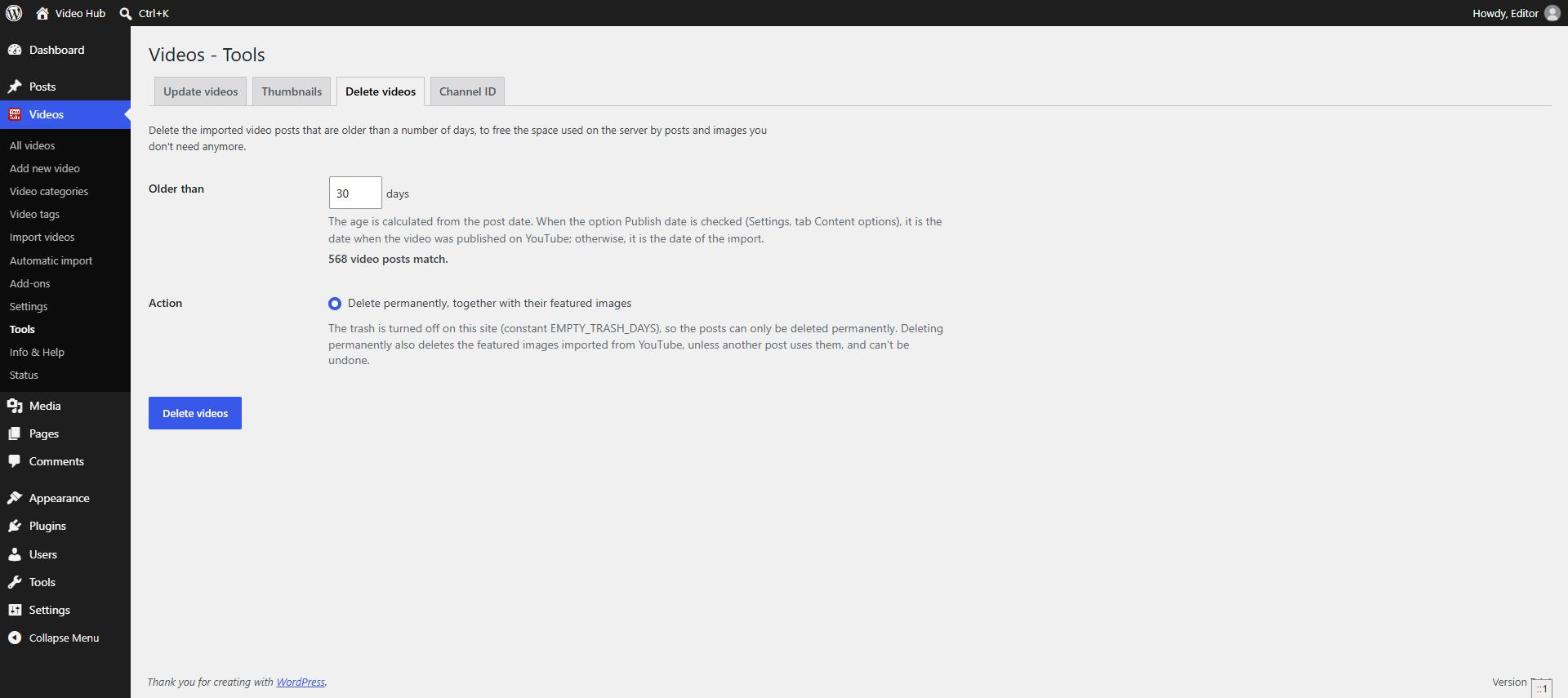
Choose the posts
Older than … days
The age is calculated from the post date. When Publish date is checked in Content options, that’s the date the video was published on YouTube; otherwise it is the date of the import. The tab shows how many video posts match before you start.
Action
- Move to the trash — the posts can still be restored from the Trash.
- Delete permanently, together with their featured images — can’t be undone.
When the trash is turned off on your site (the EMPTY_TRASH_DAYS constant), only permanent deletion is offered.
What is deleted
Featured images imported from YouTube are deleted with their posts — unless another post uses the same image. Images uploaded by your users are never deleted.
Click Delete videos and confirm. The deletion runs in batches with its progress shown, and can be stopped, continued or reset.
Tip: if an automatic import keeps importing the channel the deleted videos came from, check Don’t import deleted videos again on that import, so they don’t come back on the next pass — see Automatic video import.
Developers: the batch size and whether an image is deleted can be changed with the cbc_videos_delete_batch_size and cbc_videos_delete_image filters.