
Paste a YouTube Short into a WordPress post and you usually get the same result: a tall 9:16 video squeezed into a wide 16:9 box, with black bars on both sides and a player that is much too small on phones. Here’s why that happens and how to fix it — for one Short, or for every Short a channel publishes.
In short
- Shorts get black bars because most players are 16:9 and Shorts are 9:16.
- Video Hub (2.3+) detects each video’s proportions on import: Shorts play vertical, long videos stay widescreen.
- Auto-post a channel’s Shorts as real posts — or skip them with one switch.
Why Shorts look wrong in WordPress
WordPress embeds YouTube links through oEmbed, and most themes and plugins give every embed the same widescreen shape. A Short is vertical — 9:16 — so it gets letterboxed. YouTube’s own embed code doesn’t help either: it uses fixed width and height, so you have to know each video’s proportions and fix them by hand.
Option 1: embed a single Short by hand
For one or two Shorts, a Custom HTML block works. Take the video ID from the Shorts link (youtube.com/shorts/VIDEO_ID) and use the regular embed URL with a vertical container:
<div style="max-width:360px;margin:0 auto;aspect-ratio:9/16">
  <iframe src="https://www.youtube-nocookie.com/embed/VIDEO_ID"
    style="width:100%;height:100%;border:0"
    allow="accelerometer; autoplay; encrypted-media; picture-in-picture"
    allowfullscreen></iframe>
</div>
It works, but it’s manual: every Short needs its own block, nothing is saved as a post, and a long-form video pasted the same way will now look wrong in the other direction.
Option 2: let each video keep its own shape
Since version 2.3, Video Hub reads the real proportions of every video when it imports it — 16:9, 4:3, 1:1, 9:16 or 3:4 — and saves them on the post. Every player then uses them:
- Shorts and other vertical videos are embedded vertical, centered and never taller than the screen
- Long-form videos stay widescreen, in the same site and even in the same playlist
- Playlists resize the player as visitors move from a Short to a long video
- The same applies to single video pages, the Post Video block and the video shortcode
Because each Short is imported as a post, it also gets its own page with the title, description, thumbnail and date — something a pasted embed never gives you.
Auto-post a channel’s Shorts to WordPress
Shorts come from the same places as regular videos — a channel’s uploads, a playlist or a search — so there is nothing special to set up:
- Connect Video Hub to YouTube.
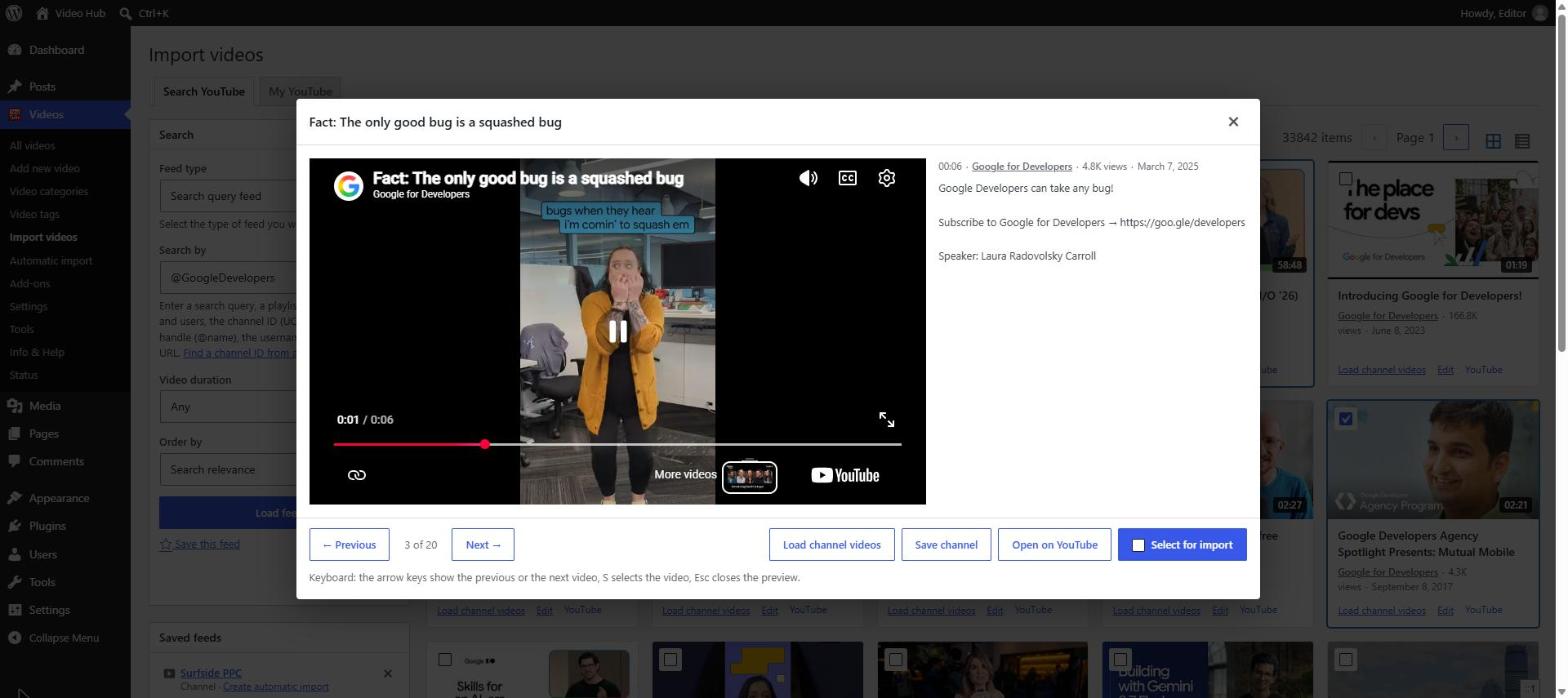
- Open Videos → Import videos, load the channel and preview its videos. Shorts carry a Short label.
- Import the ones you want, or create an automatic import for the channel so every new upload — Shorts included — is posted on its own. See how to import a YouTube channel into WordPress.
Or keep Shorts off your site
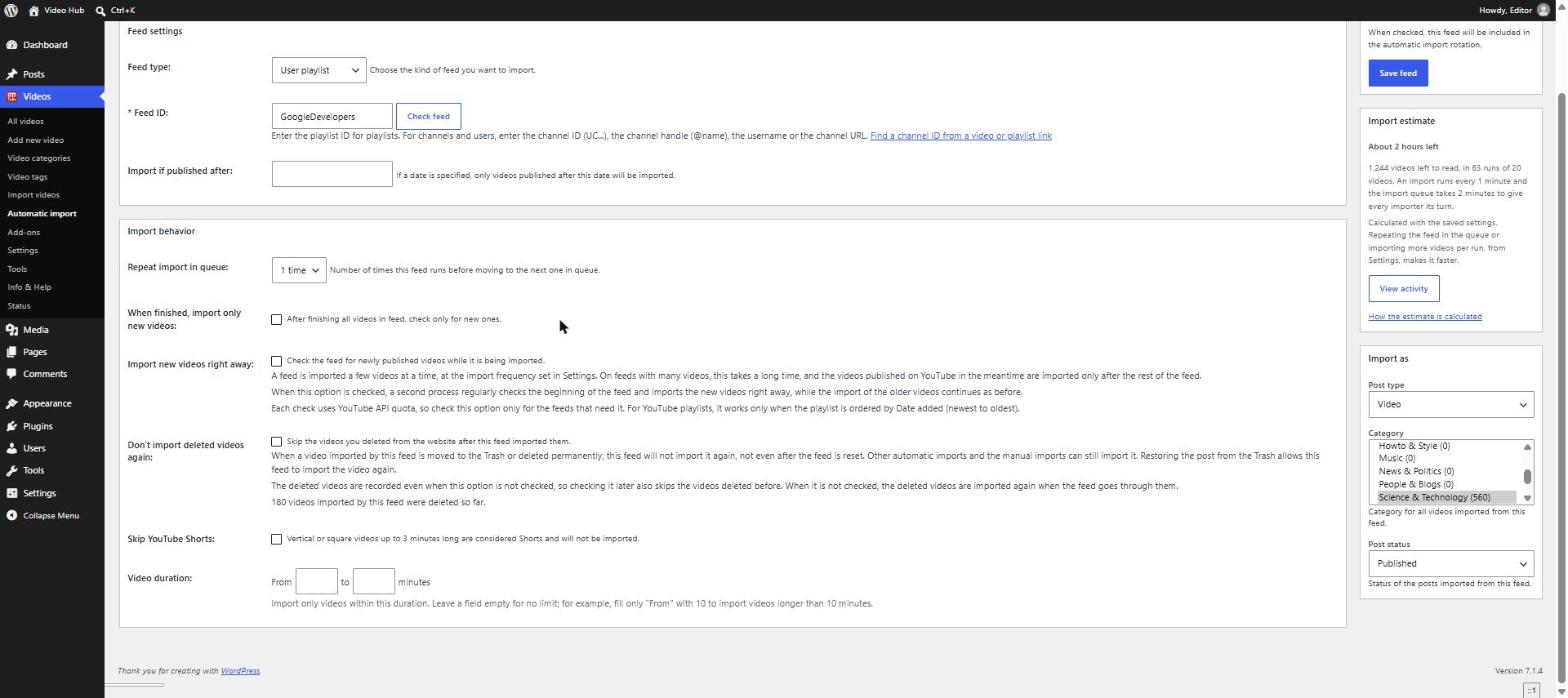
Many sites only want full episodes. Video Hub treats a video as a Short when it is vertical or square and up to 3 minutes long, and gives you two switches:
- Skip YouTube Shorts on an automatic import — skipped Shorts are counted in the import’s activity log
- Hide YouTube Shorts on the Import videos page, so “Select all” picks only long-form videos
An automatic import can also keep only videos within a duration range — for example longer than 10 minutes.
Shorts you imported before
Videos imported by older plugin versions have no saved proportions. Run Tools → Update videos once: it refreshes the details of every imported video, proportions included, and older Shorts start playing vertical too.
What Video Hub doesn’t do
There is no separate “Shorts only” feed or Shorts shelf layout, and live streams are not imported as live videos. If your site needs a swipeable Shorts reel, a dedicated feed plugin is the better fit; if you want Shorts and long videos as real, organized posts, that’s what Video Hub is for. Details are in the Shorts documentation.
YouTube Shorts in WordPress: FAQ
Can I embed a YouTube Short in WordPress?
Yes. A Short is a regular YouTube video, so it can be embedded with its video ID. To show it vertical, the player needs a 9:16 shape — set it by hand with a Custom HTML block, or use a plugin that detects each video’s proportions.
Why does my Short have black bars?
Because the player is widescreen (16:9) and the video is vertical (9:16). The video is scaled to fit the height of the box, leaving empty space on both sides.
Can I auto-post YouTube Shorts to WordPress?
Yes. An automatic import of the channel posts every new upload, Shorts included, each as its own WordPress post — or skips them if you prefer.