
Every automatic import keeps a record of what it does. You can see how long it needs to import the rest of its feed, how many videos it imported, why some videos were skipped, and when it was reset, paused or started. This page explains where to find this information and how to read it.
The time estimate
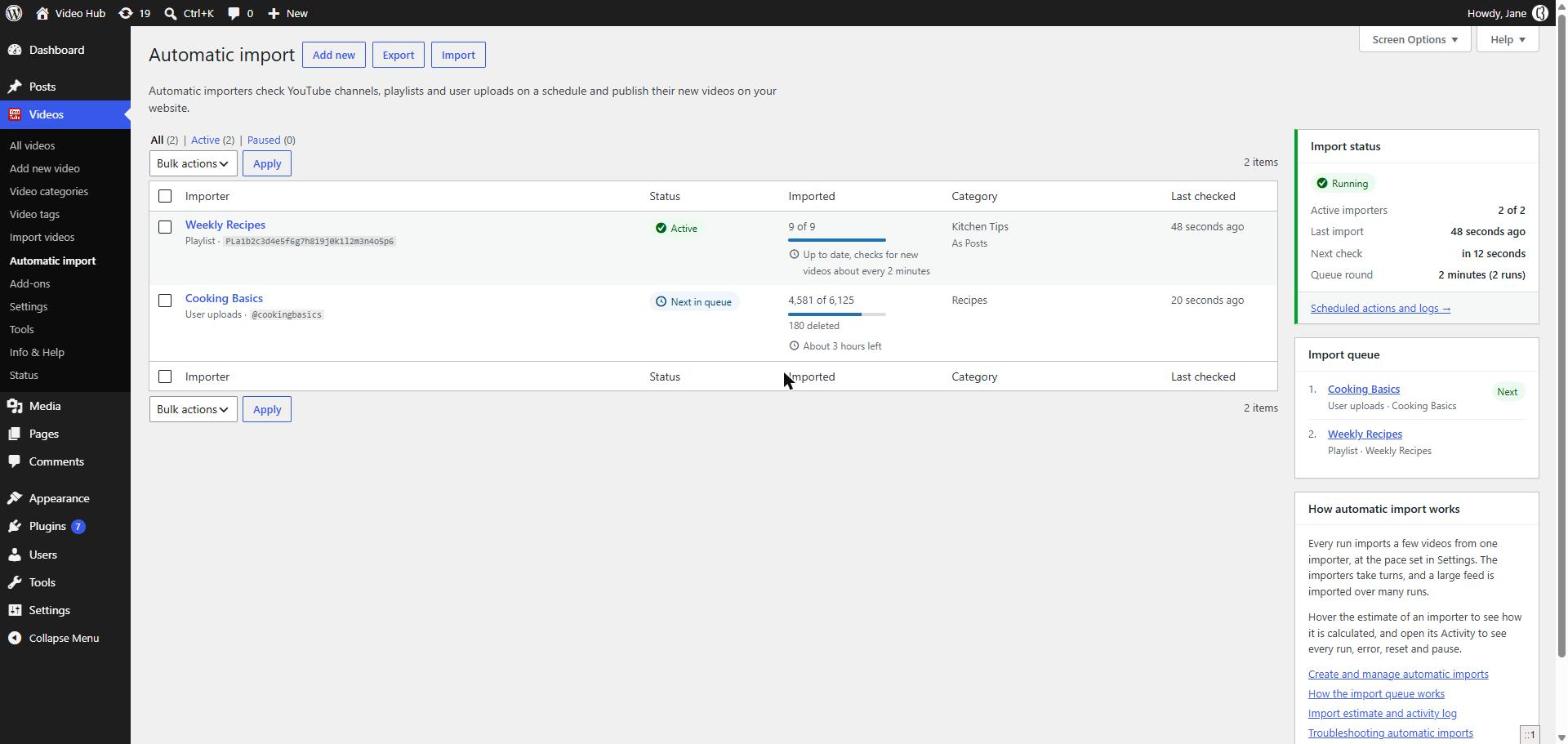
The Imported column of the Automatic import page shows, under the progress bar of each importer, how long it needs to read the rest of its feed. The same estimate is displayed in the Import estimate box, when you edit the importer, and on its Activity page.
The estimate can be:
- About 3 hours left: the importer is reading its feed. Hover the text to see the details: the videos left to read, the number of runs needed, how often an import runs and how long the queue takes to give every importer its turn.
- At most 3 hours left: the importer has an Import if published after date, so it may finish sooner.
- About 3 hours left once started: the importer is paused; this is the time it would need once added back to the queue.
- Up to date, checks for new videos about every 20 minutes: the importer has read the whole feed and now imports the new videos. The time is how long a new video waits, at most, before it is found.
- Estimate available after the first check: the importer has not checked YouTube yet, so the size of the feed is unknown.
The estimate is calculated like this:
videos left to read ÷ videos per run ÷ repeats in queue × queue round
- videos left to read: the videos in the feed, as reported by YouTube, minus the videos the importer already read. The skipped videos count as read.
- videos per run: the number of videos set in the Import pace option of the Import options.
- repeats in queue: the Repeat import in queue option of the importer.
- queue round: how long the queue takes to give every importer its turn, displayed in the Import status box. It is the sum of the Repeat import in queue values of the active importers, multiplied by the import frequency.
To make an importer faster, import more videos per run, run the imports more often, give the importer more runs with Repeat import in queue, or pause the importers that are less important. Keep in mind that more videos, more often, put more load on your server and use more YouTube API quota. For more about the queue, read The automatic import explained.
The activity page
To open the activity of an importer, hover it in the list and click Activity, or click View activity in the Import estimate box when you edit it.
The totals
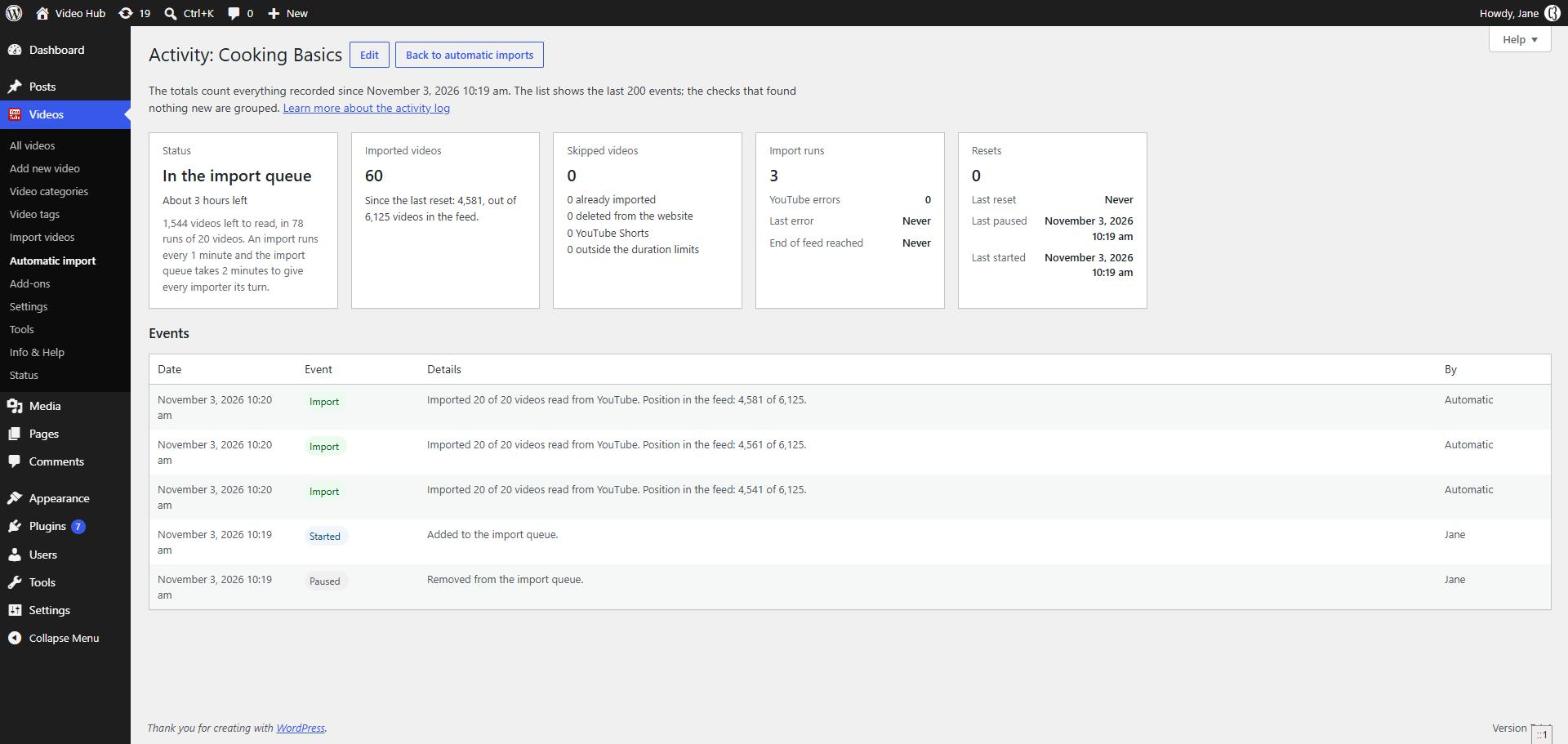
The boxes at the top of the page count everything recorded for the importer. They are kept when the importer is reset, so they show the whole history of the importer:
- Status: whether the importer is in the import queue, and its time estimate.
- Imported videos: the videos imported in total, and the videos imported since the last reset out of the videos in the feed.
- Skipped videos: the videos that were read but not imported, for each reason: already imported, deleted from the website, YouTube Shorts and outside the duration limits. The videos that could not be imported, because they are private, unlisted or returned an error, are counted separately.
- Import runs: how many times the importer checked YouTube, how many YouTube errors it got, the date of the last error and the last time it reached the end of the feed.
- Resets: how many times the importer was reset, with the date of the last reset, the last pause and the last start.
The events
Below the totals, the list of events shows the last 200 events of the importer, the newest first, with the date, the type of event, the details and who triggered it: a user, or Automatic for the events of the import queue.
- Import: a run imported videos. The details show how many videos were imported out of the videos read, why videos were skipped and the position in the feed, for example 4,581 of 6,125.
- New videos: the Import new videos right away check imported new videos.
- Nothing new: the importer checked YouTube and imported nothing. The checks in a row that imported nothing are grouped into a single event, like Checked YouTube 14 times since 10:00, no new videos to import, so they don’t fill the list.
- Error: YouTube returned an error. The same error returned again is grouped into the same event, with the number of times it was returned.
- End of feed: the importer read the whole feed. The details say whether it continues with the new videos only or reads the feed again.
- Reset, Paused and Started: the importer was reset, taken out of the queue or added back. When the importer is taken out of the queue after too many YouTube errors, the details say so.
- Created and Settings saved: the importer was created or its settings were changed.
The activity is stored with the importer and is deleted together with it. The events are recorded starting with Video Hub 2.3.7, so older importers show only what happened after the update.
See also
- Automatic video import — create and manage the importers.
- The automatic import explained — how the import queue works.
- Troubleshooting automatic imports — when the videos don’t show up.