
The Embed options tab holds the default settings of the YouTube player on your site. They are used for every video that has no player settings of its own; you can change them for a single video in the Video settings box when editing its post. If your theme is made compatible with the plugin and embeds the video itself, the theme’s player is used instead.
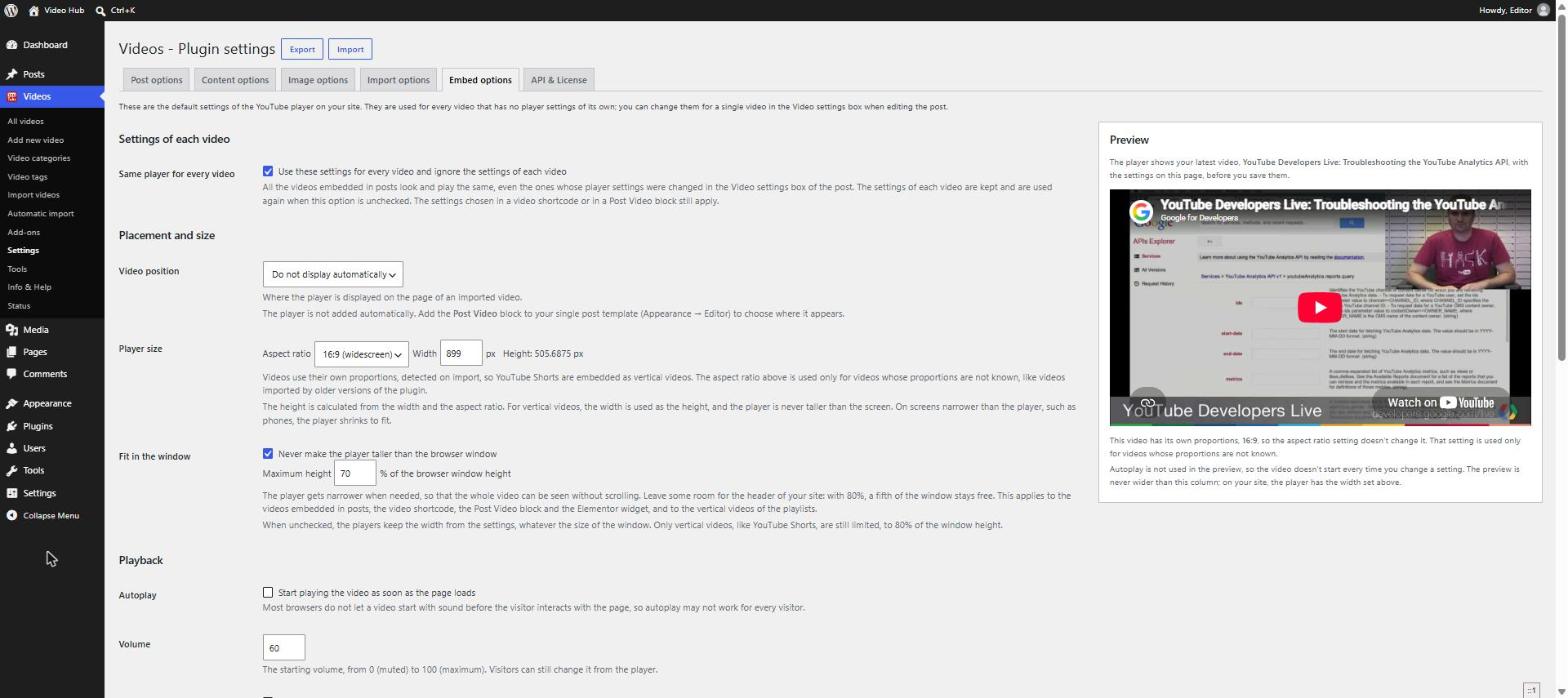
Find it under Videos → Settings, on the Embed options tab. A Preview next to the settings plays your latest video with the options on the page, and changes as you edit them — before you save.
Settings of each video
Same player for every video
Use these settings for every video and ignore the settings of each video. All videos embedded in posts look and play the same, even those whose player settings were changed in their Video settings box. Those per-post settings are kept and used again if you uncheck the option; the box on the post tells you when they are being ignored. Settings chosen in a video shortcode or in a Post Video block still apply.
Placement and size
Video position
Where the player appears on the page of an imported video: Above the post content, Below the post content or Do not display automatically. With the last choice, add the Post Video block to your single post template (Appearance → Editor) to place the player exactly where you want it. The Post Video block shows the thumbnail with a play button and loads the YouTube player only when a visitor clicks it.
Player size
Aspect ratio (16:9 or 4:3) and Width; the height is calculated for you. Since version 2.3, videos use their own proportions, detected when they are imported, so YouTube Shorts and other vertical videos are embedded vertical. The aspect ratio here is used only for videos whose proportions are not known, such as videos imported by older versions of the plugin. For vertical videos the width is used as the height, and on screens narrower than the player — phones — the player shrinks to fit.
Fit in the window
Never make the player taller than the browser window (on by default), with a Maximum height as a percentage of the window — 80% leaves a fifth of the window for your site’s header. The player gets narrower when needed so the whole video is visible without scrolling. It applies to videos embedded in posts, the video shortcode, the Post Video block, the Elementor widget and the vertical videos of playlists. When unchecked, players keep the width from the settings and only vertical videos are limited, to 80% of the window height.
Playback
Autoplay
Start playing the video as soon as the page loads. Most browsers block videos that start with sound before the visitor interacts with the page, so autoplay may not work for every visitor.
Volume
The starting volume, from 0 (muted) to 100. Visitors can still change it.
Related videos
Suggest videos from any channel when the video ends. YouTube always shows suggestions at the end of a video. When unchecked, the suggestions come only from the same channel as the video — YouTube no longer allows hiding them completely.
Captions
Show the captions when the video starts, for videos that have them. When unchecked, captions appear only for visitors who turned them on in YouTube.
Captions language
A language code such as en, fr or pt-BR. When the video has captions in that language they are used instead of the visitor’s language. Leave it empty to follow the visitor’s language.
Videos play inside the page on iPhone instead of opening full screen.
Player controls
Controls bar
Show the player controls — the bar with the play button, progress bar and volume.
Fullscreen
Show the fullscreen button.
Progress bar color
Red or white. YouTube currently ignores this option in its new player and shows a red progress bar for every video; the option stays because YouTube still documents it.
Keyboard shortcuts
Disable the keyboard shortcuts of the player — the spacebar to play or pause, the arrow keys to seek or change the volume.
Annotations
YouTube removed annotations in 2019, so this option has no visible effect on most videos.
Privacy
Privacy-enhanced mode
Embed videos from youtube-nocookie.com. With this domain, YouTube doesn’t store information about visitors who only see the player; it starts when they play the video. It can help your site follow privacy laws such as the GDPR.
What changed in version 2.3.4
The player options were checked against the YouTube player parameters:
- The Hide the YouTube logo option (modest branding) was removed — YouTube stopped supporting it in 2023.
- Captions and Captions language are new; videos play inline on iPhone.
- Embed codes saved for theme compatibility use the same parameters and the youtube-nocookie.com domain when it is enabled.
Developers: see the cbc_video_settings, cbc_override_post_video_settings, cbc_player_max_height and cbc_nocookie_embed filters in the filters reference.