
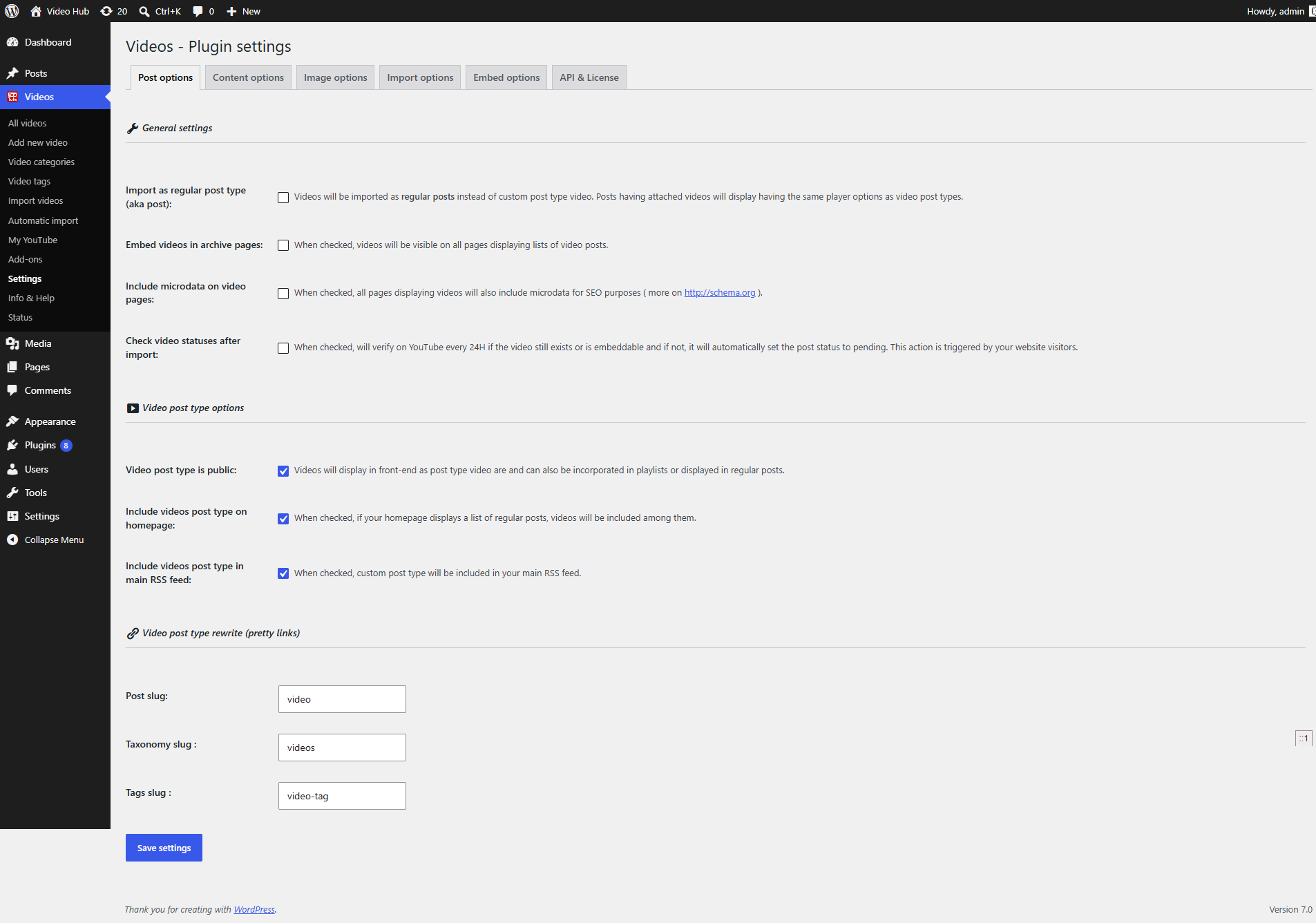
The Post options tab controls where your imported YouTube videos live in WordPress — as Video Hub’s own “video” post type, or as regular posts — and how those pages behave. You’ll find it under the Videos → Settings menu, on the Post options tab.
The settings are grouped into three sections: General settings, Video post type options and Video post type rewrite.
General settings
By default, Video Hub imports videos as its own “video” custom post type, with a “videos” category taxonomy. Keeping videos in their own post type makes them easy to manage separately from the rest of your content and simple to style with custom post type templates.
Import as regular post type (post)
Prefer your videos to live alongside your blog posts? Enable “Import as regular post type (aka post)” and Video Hub will import every video as a standard WordPress post and handle the embedding for you.
Embed videos in archive pages
By default, videos are embedded only on single post pages. Enable this option to embed them on archive pages too. Keep in mind that embedding many videos on one page can slow it down.
Include microdata on video pages
Microdata is structured information that search engines read to understand your page better — and it’s one reason imported videos can earn richer search results. With this enabled, Video Hub adds video duration, title, description, thumbnail and upload date to each video page. See more on video SEO in WordPress.
Check video statuses after import
When enabled, Video Hub does a daily check on each video post that gets a visit, asking YouTube whether the video is still public. If a video has been removed, the post is set to pending review so visitors don’t land on a dead embed.
Note: this check is triggered by visits, so on a low-traffic site it may run rarely.
Video post type options
These options apply only to the custom “video” post type. If you import videos as regular posts, none of them apply.
Video post type is public
You can register the “video” post type as private. The videos then won’t appear on your site’s front end on their own, but you can still use them to build playlists or place them anywhere with the plugin shortcode.
Include video post type on homepage
If your front page shows your latest posts, enable this to mix “video” posts in among your regular posts there.
Include video post type in main RSS feed
Likewise, enable this to include “video” posts in your main RSS feed alongside regular posts.
Video post type rewrite
This section lets you change the URL slugs for the “video” post type and the “videos” taxonomy.
Post slug
Change the post type slug from video to anything you like. The value can’t contain spaces or special characters, and it must be unique on your site.
Taxonomy slug
Change the taxonomy slug from videos to a value of your choosing. As above, it must contain no spaces or special characters and be unique on your site.