
Embed Plus alternative
Embed Plus for YouTube Alternative
Embed Plus for YouTube is one of the most complete embed plugins — galleries, live streams, facade mode. If you would rather have every YouTube video as a post on your own site, imported on its own, Video Hub is the alternative built for that.
The short answer
Which one fits your site?
Embedding and importing solve different problems. Choose by where the videos should live: in a player on your pages, or as pages of their own.
Embed Plus for YouTube
Stay with it if you embed
- Many single videos inside articles, with facade mode and deferred JavaScript
- Live streams and premieres
- A consent message before YouTube loads
- A free version covers what you need
Video Hub
Switch if you want a video library
- Every video as a WordPress post or in a video post type, with its own URL
- A whole channel or playlist imported in the background, back catalog included
- Videos picked from several channels and searches, imported as drafts for review
- Tools that refresh video data, repair thumbnails and clean up old posts
Embed vs import
An embed borrows the video. An import gives it a page on your site.
An embed puts YouTube’s player on one of your pages, and a gallery lays out a channel or playlist. Either way the video lives on YouTube: your site shows a player, but there is no post for that video to categorize, write around or link to.
Embed Plus does embedding very well, and its listing doesn’t mention importing videos as posts. Video Hub does the opposite job:
- Import a channel or playlist as posts — back catalog included — and keep adding new uploads in the background
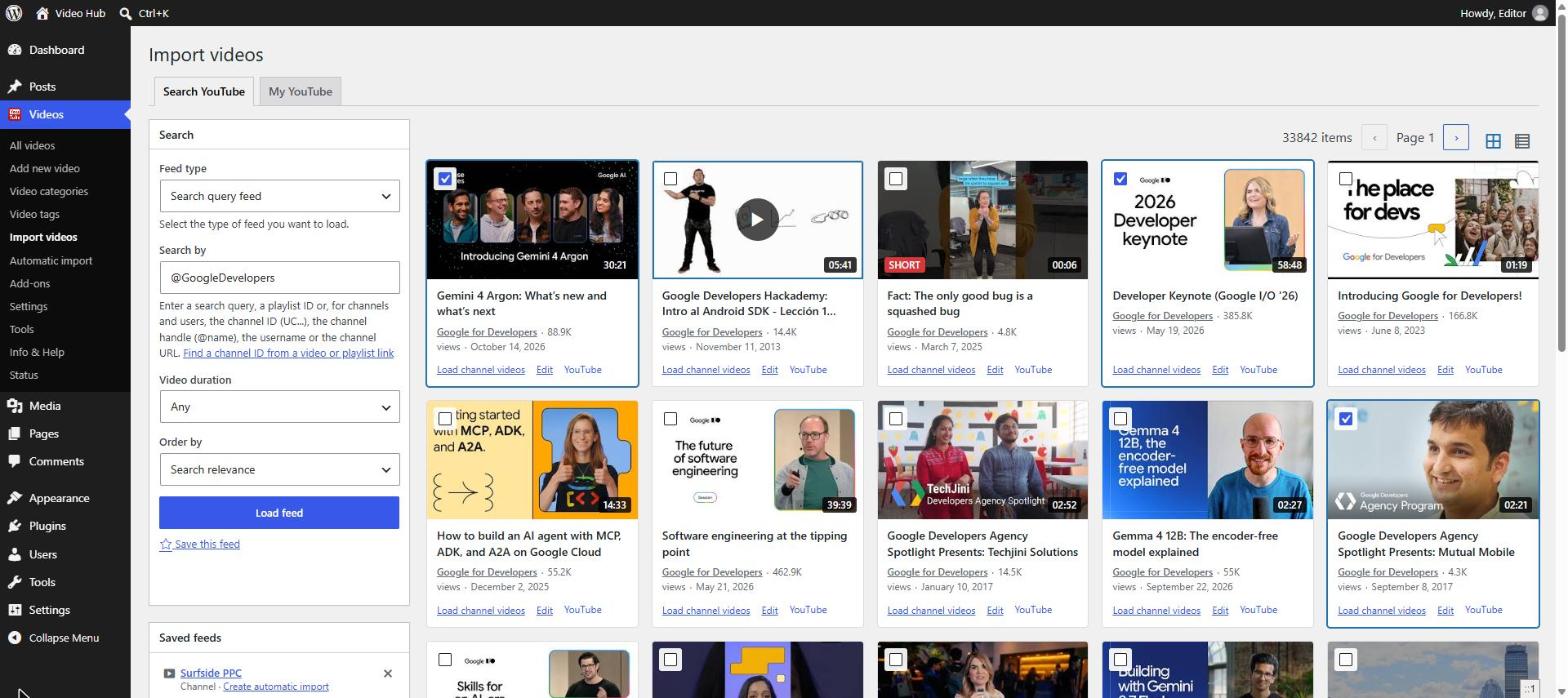
- Pick videos from searches, channels and playlists in one selection, with already-imported videos marked
- Import as published, draft or pending review, with categories and an author for each import
- Show the videos in 6 playlist themes, a category archive or the Post Video block
Side by side
Video Hub vs. Embed Plus for YouTube
The differences buyers ask about most. “Not listed” means Embed Plus doesn’t mention it — not necessarily that it’s missing.
| Feature | Video Hub | Embed Plus for YouTube |
|---|---|---|
| The basics | ||
| Main job | Imports YouTube videos into WordPress as posts | Embeds YouTube videos, galleries and live streams |
| Free version | No30-day money-back guarantee | Yes |
| Paid from | $49/year, 1 site · $99 for 5 · $169 unlimited; 40% off when you renew before expiry | $49.99/year (sale price; listed at $69.99) |
| WordPress.org | Premium plugin, sold by CodeFlavors | 100,000+ active installs · 4.6/5 (572 reviews) |
| Videos as WordPress content | ||
| Videos saved as posts | Every planRegular posts or a video post type | Not listedEmbeds only |
| Channels & playlists | YesImported as posts, back catalog included, kept in sync | YesGalleries that show the latest videos |
| Pick videos from many channels | YesOne selection across channels, playlists and searches | Not listed |
| Review before publishing | YesDraft or pending review, per import | Not listed |
| Display & playback | ||
| Layouts | 6 playlist themes, Gutenberg blocks, an Elementor widget, shortcodes and widgets | Gallery layout and a Gutenberg wizard block; list, slider and popup layouts in Pro |
| YouTube Shorts | YesVertical videos embedded vertical; skip or hide Shorts | YesShorts embeds; filter Shorts out of galleries (Pro, beta) |
| Live streams & premieres | No | Yes |
| Click-to-load player | PartialThe Post Video block | YesFacade mode for galleries and videos |
| Privacy | PartialNo-cookie embed | YesNo-cookie mode and a consent message |
| SEO & upkeep | ||
| Video SEO | YesA page per video; schema.org microdata; works with Yoast Video SEO | Pro“Automatic tagging for video SEO” |
| Viewing analytics | NoNot built in | ProAnalytics dashboard with view tracking |
| Library maintenance | YesUpdate video data, repair thumbnails, delete old posts | Not listed |
Full disclosure: we make Video Hub. Embed Plus details come from its WordPress.org listing and pricing page, checked on 5 November 2026; prices change, so check its site before you buy.
With Video Hub
What you get when you import instead
Every plan includes every feature: all import sources, automatic imports, the 6 playlist themes, updates and support.
A page per video
Regular posts or a dedicated video post type, each with its own URL on your domain, archive pages and room for your own text.
Background imports
Automatic imports follow channels, playlists and user uploads, work through the back catalog and keep adding new uploads.
Pick from many channels
Preview videos as cards, keep your selection across searches, channels and playlists, then import them together.
Review before publishing
Each import can publish right away or create drafts and pending-review posts for an editor.
Shorts look right
Vertical videos stay vertical on single pages and in playlists — or skip Shorts in automatic imports.
A library that stays healthy
Refresh views, durations and thumbnails, repair missing images and remove old posts from the Tools page.
Switching
Moving from embeds to a video library
- Connect Video Hub to YouTubeThe plugin walks you through the OAuth setup and tests the connection. Get your Client ID and Secret
- Import your channel or playlistsEach video becomes a post. Automatic imports keep adding new uploads, so the library stays current without you.
- Link your articles to the video pagesReplace galleries with Video Hub playlists, and point the articles that embedded a video to its new page on your site.
Video Hub doesn’t read other plugins’ shortcodes. Before you deactivate Embed Plus, check the posts that use its embeds — and keep it if you need live streams, which Video Hub doesn’t cover.
★★★★★
“Great plugin. Once set up properly, it does exactly what it advertises. […] It imported my 200 YouTube videos without batting an eyelid, and has given me a new WordPress video site in a heartbeat. Fantastic!”
MrMasterKey · CodeCanyon customer
From Video Hub’s years on CodeCanyon; it is now sold exclusively by CodeFlavors.
FAQ
Embed Plus alternative questions
Is Video Hub a good Embed Plus alternative?
Yes, if you want YouTube videos as posts on your site rather than embeds. Video Hub imports channels, playlists and single videos into WordPress and keeps importing new uploads. If you mostly embed single videos or live streams inside articles, Embed Plus for YouTube is the better fit.
Can Embed Plus import YouTube videos as WordPress posts?
Its WordPress.org listing doesn’t mention importing videos as posts — it embeds videos, galleries and live streams. It can migrate embeds made with other YouTube plugins’ shortcodes, which is a different thing.
Does Video Hub support live streams and premieres?
No. Video Hub imports uploaded videos, Shorts included, but not live streams. For live streams and premieres, Embed Plus for YouTube is a good choice.
Does Video Hub load the YouTube player only on click?
In the Post Video block, yes: it shows the thumbnail and a play button and loads the YouTube player on the first click. Other Video Hub embeds use the standard player. Embed Plus offers its facade mode more broadly, for galleries and single videos.
Does Video Hub have a free version?
No. Plans start at $49 a year for one site, with a 30-day money-back guarantee. Every plan includes every feature; higher plans only add more sites.
Is importing better for SEO than embedding?
An imported video gets its own page on your domain that you can optimize, link to and add your own text to. An embed adds a player to a page you already have. Google still decides whether a page also gets a video result.
Comparing more options? See the best YouTube plugins for WordPress, or read the Video Hub FAQ.
Give every video a page of its own
Import your YouTube channel as WordPress posts and keep it in sync on its own. Plans start from $49/year, with automatic updates, support and a 30-day money-back guarantee.